Quick View Cube control


Use the Quick View Cube control to rotate the view by selecting specific locations on the cube.
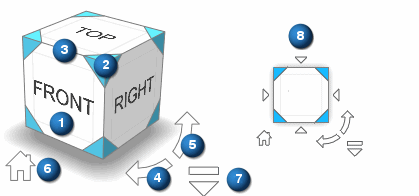
| 1 | Face—Select any face and the model rotates to present that view. |
| 2 | Isometric view |
| 3 | Edge—Orients to the 45-degree view of the two faces that share the selected edge. |
| 4 | Rotates clockwise. |
| 5 | Rotates counterclockwise. |
| 6 | Home—Rotates to the standard ISO view. |
| 7 | Settings—Adjust the display of the control using the Quick View Cube Settings dialog box. |
| 8 | Standard orthogonal view—Rotates to the appropriate corresponding orthographic view based on the faces that share the selected corner. |
If you close the Quick View Cube and want to open it again, choose the Home tab→Orient group→Quick View Cube Settings command  , and select the Show Quick View Cube in window check box.
© 2021 UDS